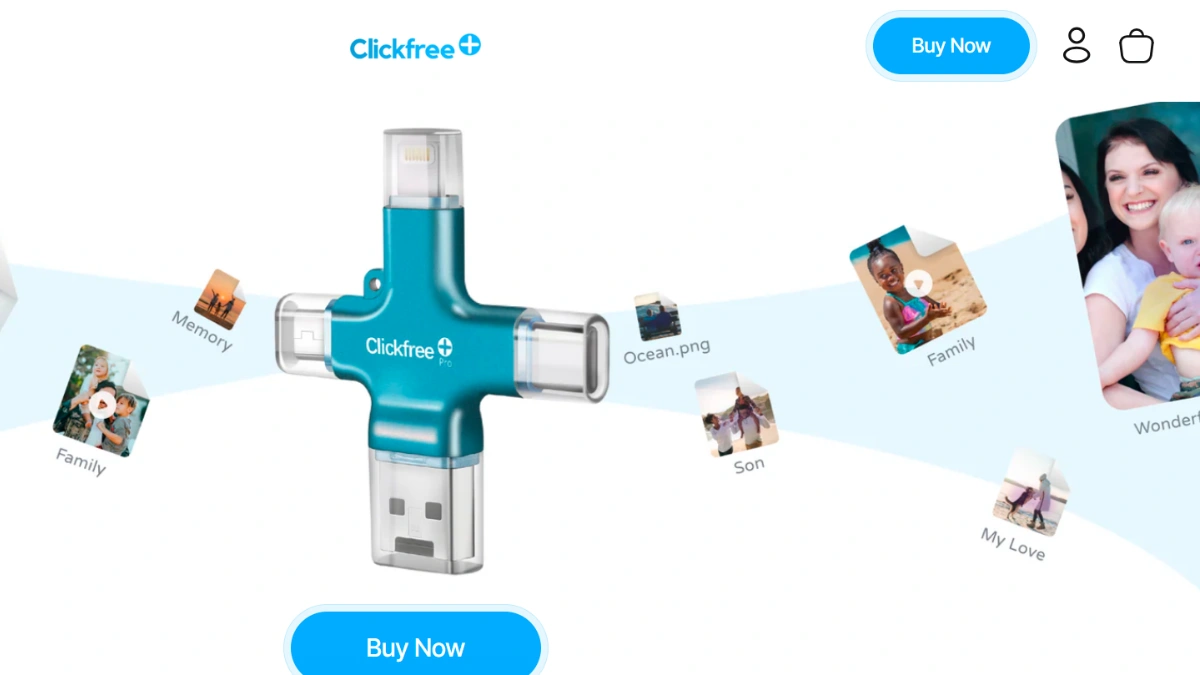
ClickFree promises to back up your entire photo library with a single click. But with deals cutting the price in half, is it actually worth adding to cart?
ClickFree is a USB backup device built to save photos, videos, and contacts straight off your phone or computer without touching a cloud subscription. It plugs into iPhones, Android devices, iPads, PCs, and Macs, and doubles as extra storage when your device is full. VYDToday researched this brand’s deals to help you decide if it is worth buying.
TABLE OF CONTENTS
What Can You Actually Get from ClickFree?
ClickFree Pro Backup Devices
- Available in 64GB, 128GB, and 256GB storage sizes to match how many photos and videos you’re backing up
- Four built-in connectors (Lightning, USB-C, USB-A, Micro USB) so one device works across iPhone, Android, iPad, PC, and Mac
- One-click backup app that finds and saves your camera roll without eating into your device’s storage
Colors & Travel Accessories
- Devices come in multiple finishes — Garnet Red, Mint Green, Beige, Sky Blue, and Pearl White among them
- A matching nylon travel case is sold separately to keep the device protected on the go
AI Photo Editing & Scanning Tools
- Built-in scanning feature turns physical photos and documents into digital files automatically
- ClickFree AI can colorize old black-and-white photos and enhance scanned images
- Some bundles include a custom photobook voucher and unlimited AI credits
ClickFree: The Current Deals


No brand found for slug clickfree.


Why You Should Buy from ClickFree
Our research found that ClickFree’s biggest selling point is what it removes from the equation: no monthly cloud storage fees, no subscriptions, and no complicated setup. You plug it in, tap backup, and your photos and videos are saved to a physical device you control.
We discovered that the brand has sold over 200,000 units, and its reviews consistently mention how much phone storage people free up within minutes of their first backup. After analyzing the product lineup, a few things stood out:
- Works across iOS, Android, PC, and Mac without needing separate devices
- Doubles as a way to capture new photos and videos directly to the drive, bypassing phone storage entirely
- AI scanning and colorizing tools add value beyond simple backup
ClickFree vs Competitors
| Feature | ClickFree Pro | PhotoStick Omni | Picture Keeper Connect | iDiskk Flash Drive |
|---|---|---|---|---|
| Storage Options | 64GB / 128GB / 256GB | 32GB up to 256GB | 64GB | 256GB |
| Device Compatibility | iPhone, Android, iPad, PC, Mac | iOS, Android, Mac, PC | iPhone, Android, USB-C, Mac | iPhone, iPad, Android, Samsung |
| Monthly Fees | None | None | None | None |
| Extra Features | AI photo colorizing, document scanning | Duplicate removal, audio file backup | Contacts backup | Password protection |
Our research found that most competitors in this space share the same no-subscription selling point, so the real differentiator comes down to extra features like AI editing and scanning. For more brand breakdowns like this, check out vydtoday.
Pros and Cons
✅ Pros
- No cloud subscription needed
- Works across nearly any device
- AI photo colorizing included
- Free shipping and support
- Frees up phone storage fast
❌ Cons
- Slight learning curve at first setup
- No wireless or cloud syncing
- Physical device can be lost
- Some colors sell out quickly
- Screen must stay unlocked during backup
Discounts, Coupon Codes & Gift Cards
- Our team found ClickFree Pro devices currently discounted up to 50% off retail price across every storage size and color.
- We discovered these are View Your Deal exclusive offers, tied to the brand’s official TV segment airings, with stock reserved until the segment goes live.
- Bundles we found include an unlimited AI credits voucher and a custom photobook voucher at no extra cost.
Final Verdict
We recommend ClickFree for anyone tired of paying monthly cloud fees just to keep their photos safe. Our research suggests the device delivers on its core promise: simple, one-click backup across nearly any phone or computer.
It’s worth buying if you want a one-time purchase that frees up phone storage and adds AI editing perks. It’s less worth it if you specifically want automatic wireless or cloud syncing, since ClickFree requires plugging the device in manually.
You can explore more brands on our related Electronics & Accessories page.

Steve Harrison
E-commerce & Savings Expert with over 10 years of experience in e-commerce trends.